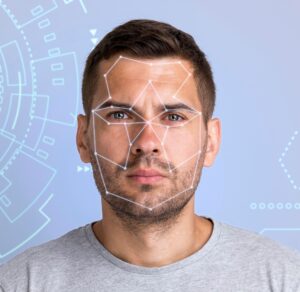
In today’s digital-first world, creating a lifelike AI avatar isn’t just a trend—it’s a powerful tool for brand identity, content creation, and customer interaction. Whether you’re a content creator, startup founder, educator, or marketing professional, understanding how to make AI avatar helps you connect, automate, and scale in ways never before possible.
What Is an AI Avatar?
An AI avatar is a digitally generated version of a person or fictional character. Depending on the platform and purpose, it can be:
- Static (for profile pictures or branding)
- Talking (animated head-and-shoulders video synced with voice)
- Fully interactive (real-time digital humans used in apps or virtual worlds)
These avatars are created using artificial intelligence to replicate facial features, gestures, and speech patterns, making them ideal for communication, marketing, or storytelling.
 How to Make an AI Avatar (Step-by-Step)
 How to Make an AI Avatar (Step-by-Step)
1. Choose the Right AI Avatar Generator
Different goals call for other tools. Below are the top platforms based on use cases:
For Static Avatars (Images or Illustrations)
- Canva: Ideal for designing branded cartoon-style avatars
- Fotor and Picsart: Great for portrait-style avatars and stylized selfies
For Talking Avatars (Video-Based)
- HeyGen: Realistic talking avatars, lip-synced with uploaded scripts
- Synthesia: Professional-grade avatars for corporate presentations
- D-ID and VEED.IO: Good for marketing, training, and explainer videos
For Custom Character Creation (Not Based on a Real Person)
- Adobe Firefly: AI image generation with rich detail
- Artbreeder: Merge traits and control appearance using sliders and genes
2. Prepare Your Input Materials
Your avatar’s quality depends heavily on your input.
For Image-Based Avatars:
- Use a high-resolution headshot
- Ensure even lighting and a plain background
- Maintain a neutral expression for flexibility
For Talking Avatars:
- Record a short video clip or provide a voice script
- Find a quiet, well-lit room
- Follow platform-specific tips to improve results
3. Generate and Customize the Avatar
Upload your file to the tool of your choice. Then:
- Pick from different styles, expressions, backgrounds, and clothing
- For animated avatars, choose voice, language, and accents
- Preview and tweak as needed for branding or personalization
4. Download and Deploy
Once finalized:
- Download your avatar in formats like JPG, GIF, or MP4
- Use it in videos, social media, website headers, or product demos
- Embed it in presentations, onboarding flows, or even chatbot experiences
Static vs. Animated vs. Interactive Avatars: Which Is Right for You?
| Feature | Static Avatar | Talking Avatar | Interactive Avatar |
|---|---|---|---|
| Best For | Social profiles, branding | Tutorials, explainers | Customer service, VR apps |
| Tools to Use | Canva, Picsart, Fotor | HeyGen, D-ID, Synthesia | Soul Machines, Replika |
| Input Required | Photo | Script + video/image | API + behavioral logic |
| Complexity | Low | Medium | High |
| Output | Image | Lip-synced video | Real-time AI character |
Real-World Application: How Tools Empower AI Avatar Marketing
Many small businesses struggle to scale video marketing, train staff, or provide 24/7 interaction. That’s where AI avatars shine—and tools bridge the gap by offering:
- Drag-and-drop website builders that embed avatars as customer guides or lead capture assistants
- AI copywriting features to generate customized scripts for avatar voiceovers
- Automation flows that connect avatars with email sequences, landing pages, and onboarding journeys
Example Use Case:
A coaching business used an AI avatar as a digital front-facing representative. Automation tools, it introduced services, answered FAQs, and guided users, resulting in 3x conversion rates within 30 days.
Future Trends in AI Avatar Creation
- Hyperrealistic avatars that mimic micro-expressions and tone
- Multilingual avatars that auto-switch languages for global reach
- Metaverse integration, where avatars can represent you in 3D virtual spaces
- Real-time avatars in customer service using generative response AI
Frequently Asked Questions (FAQs)
What’s the easiest way to create an AI avatar?
Use Canva or Picsart to create a static avatar, or Synthesia or HeyGen for video avatars with voice support.
Can I create a free AI avatar?
Yes. Many platforms offer free tiers with basic features. Canva, Fotor, and VEED.IO all have limited free options.
Do I need a video of myself to create an AI avatar?
Not always. You can generate avatars from just a photo or scratch using tools like Adobe Firefly or Artbreeder.
Can AI avatars speak in different languages?
Yes. Tools like Synthesia and HeyGen offer multilingual voice output with accent and tone customization.
What formats do AI avatars export in?
Typically, JPG is used for images and MP4 is used for videos. Some tools also offer GIF, PNG, and transparent backgrounds.